<?xml version="1.0" encoding="utf-8"?><feed xmlns="http://www.w3.org/2005/Atom" ><generator uri="https://jekyllrb.com/" version="4.3.4">Jekyll</generator><link href="https://blog.slevel.xyz/feed.xml" rel="self" type="application/atom+xml" /><link href="https://blog.slevel.xyz/" rel="alternate" type="text/html" /><updated>2026-09-11T18:20:34+00:00</updated><id>https://blog.slevel.xyz/feed.xml</id><title type="html">Slevel blog</title><subtitle>Yet another techy blog on the internet. You&apos;ll find information and updates about my homelab infrastructure, as well as general programming posts. That is, if I can be bothered to write them.</subtitle><author><name>MMK21</name><email>hi@slevel.xyz</email></author><entry><title type="html">Granian vs Uvicorn: An unscientific RAM usage comparison</title><link href="https://blog.slevel.xyz/2026/09/11/granian-vs-uvicorn.html" rel="alternate" type="text/html" title="Granian vs Uvicorn: An unscientific RAM usage comparison" /><published>2026-09-11T18:11:03+00:00</published><updated>2026-09-11T18:11:03+00:00</updated><id>https://blog.slevel.xyz/2026/09/11/granian-vs-uvicorn</id><content type="html" xml:base="https://blog.slevel.xyz/2026/09/11/granian-vs-uvicorn.html"><![CDATA[<details>
<summary>Part of a new "microblog" series (click to read more)</summary>

Writing long, insightful blog posts is pretty hard, but sharing my random findings is fun (and maybe even slightly useful :O).

So I've decided to start writing some shorter blog posts with things I've recently done or learnt - this is the first one!

</details>

<h2 id="the-background">The background</h2>

<p>I’ve noticed that whenever I write a simple Python API (usually with FastAPI), its Docker container takes something like 60 MB of RAM. (Which isn’t a lot, but when you’re running 10 of them on a Pi, it adds up.) I thought perhaps swapping the default server program (Uvicorn) with <a href="https://github.com/emmett-framework/granian">Granian</a> might help - after all, it’s written in Rust so it must be blazingly fast and efficient, right??</p>

<h2 id="the-findings">The findings</h2>

<p>I tested switching out the web server used for my <a href="https://github.com/MMK21Hub/my-my-lboro">My myLboro</a> project. (that’s a mouthful)</p>

<p>I fetched the root page once and then checked memory usage with <code class="language-plaintext highlighter-rouge">docker stats</code>. As I said, this is not a scientific analysis.</p>

<ul>
  <li>With Uvicorn, memory usage was at <strong>66 MiB</strong></li>
  <li>With Granian, memory usage was at <strong>133 MiB</strong></li>
</ul>

<p>So this is actually a win for Uvicorn! I’m sure Granian is perfectly fast, but low-memory-footprint it is not.</p>]]></content><author><name>MMK21</name><email>hi@slevel.xyz</email></author><category term="microblog" /><summary type="html"><![CDATA[The first microblog (hopefully not the last?)]]></summary></entry><entry><title type="html">RPi incident report: SD card failure on 24 July 2025</title><link href="https://blog.slevel.xyz/2025/07/24/rpi-sd-card-incident.html" rel="alternate" type="text/html" title="RPi incident report: SD card failure on 24 July 2025" /><published>2025-07-24T15:00:00+00:00</published><updated>2025-07-24T15:00:00+00:00</updated><id>https://blog.slevel.xyz/2025/07/24/rpi-sd-card-incident</id><content type="html" xml:base="https://blog.slevel.xyz/2025/07/24/rpi-sd-card-incident.html"><![CDATA[<p>On 24 July 2025, all services hosted on the <a href="/infradocs/rpi">Raspberry Pi 400</a> went offline. This was due to the Pi’s microSD card (which provides the root and boot filesystems) failing and producing I/O errors for write operations.</p>

<h2 id="timeline">Timeline</h2>

<p>All events happened on <strong>24 July 2025</strong>. Times are quoted in the local timezone, Europe/London, which was BST (UTC+1) at the time.</p>

<h3 id="timeline-of-problems">Timeline of problems</h3>

<ol>
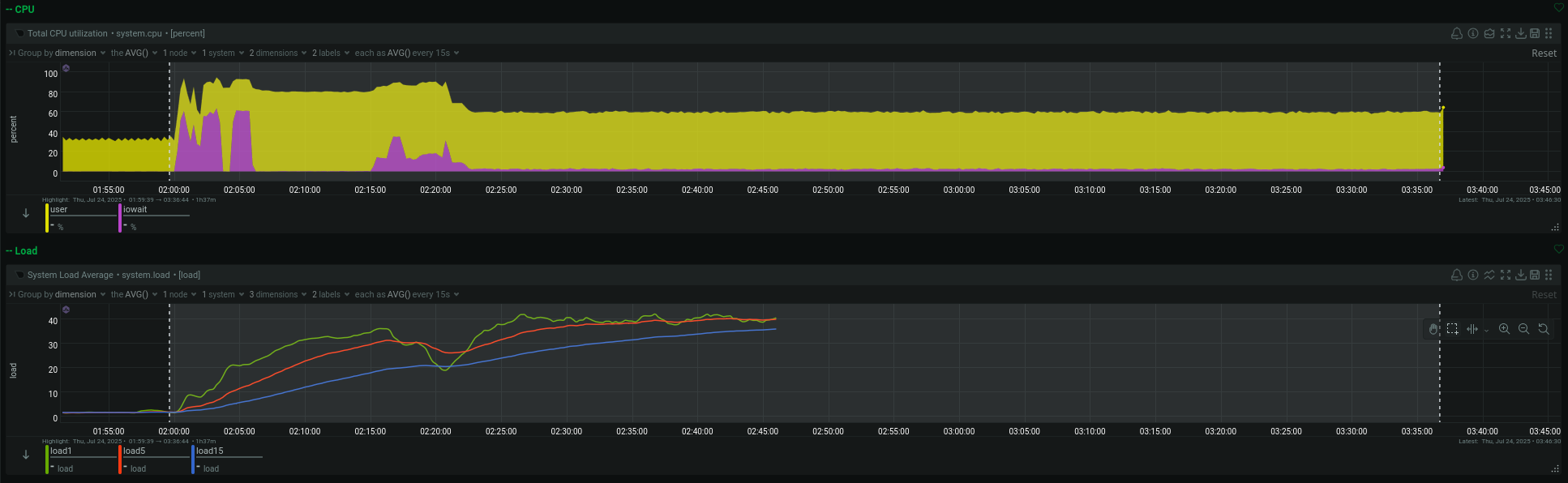
  <li>02:00:00 – CPU usage becomes abnormally high, going from around 35% to 100%. It remains at 100% until metrics became unavailable.
    <ul>
      <li>Note: some backups are scheduled to run at 02:00, so that almost certainly triggered the CPU spike.</li>
      <li>Normally, CPU usage spikes to between 80%–100% while these backups are being created, but only for about 5 minutes or less.</li>
    </ul>
  </li>
  <li>02:00:00 – Disk utilisation rises to around 48%, consistent with normal disk usage during backups.</li>
  <li>02:15:12 – Disk backlog for the SD card peaks at 7 min 26 sec.</li>
  <li>02:44 (01:44 UTC) – <a href="https://stats.uptimerobot.com/Pr5KEg7eN9/796661538">Monitoring from UptimeRobot</a> detected that the Pi had stopped responding to HTTP requests. (<a href="https://dashboard.uptimerobot.com/incidents/817160927">Internal incident link</a>)
<!-- 5. 03:36:07 – Disk backlog rises from around 2.5 seconds to around 5 seconds. --></li>
  <li>03:37:39 – Disk utilisation rises to around 100%.</li>
  <li>Around 03:40 – Netdata metrics become unavailable
    <ul>
      <li>This is almost certainly because the write errors prevented Netdata from writing to its database.</li>
    </ul>
  </li>
</ol>

<p><img src="/assets/2025-07-24-cpu-load.png" alt="CPU usage and load during the incident" /></p>

<h3 id="timeline-of-troubleshooting">Timeline of troubleshooting</h3>

<p>At around 12:00, I try to access Immich, and realise that the Pi is unresponsive. I attempt to troubleshoot by connecting my monitor to the Pi, but the monitor doesn’t even detect the Pi.</p>

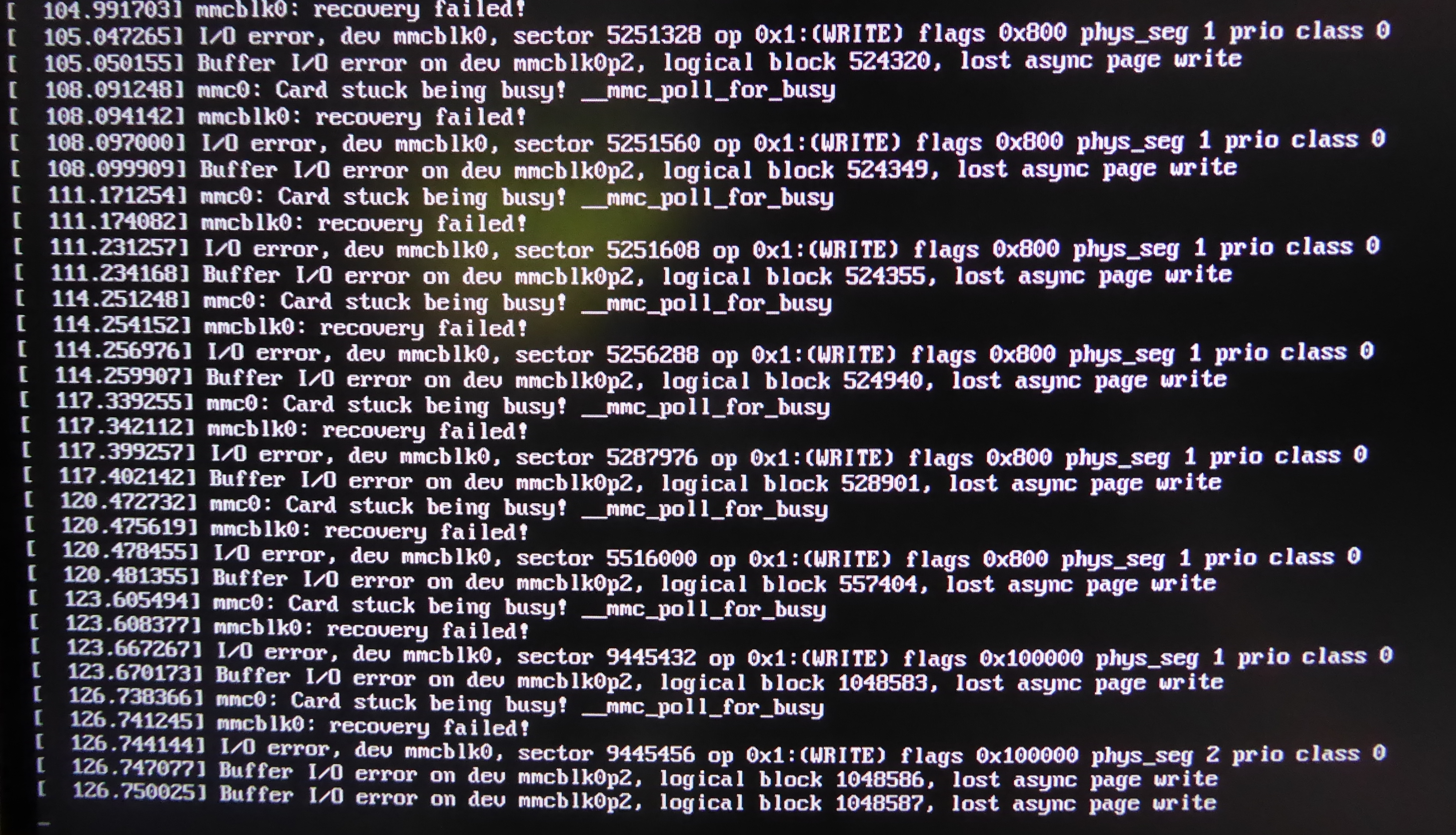
<p>I restarted the Pi (forcing power off by holding Power for 10 seconds), and it soon started printing I/O error messages to the console.</p>

<p><img src="/assets/2025-07-24-io-errors.png" alt="Photo of the virtual console output" /></p>

<h3 id="timeline-of-recovery">Timeline of recovery</h3>

<p>I used GNOME Disks to create a disk image from the failed SD card (under the assumption that read operations would still work correctly). I then used GNOME Disks to restore the image to a new SD card.</p>

<ol>
  <li>I boot the Pi up with its new SD card</li>
  <li>14:29 – NTP system time sync completes, giving the first correctly-timestamped journal entry after the incident</li>
  <li>14:31:30 – Metrics become available in Netdata, indicating that the Pi has become operational again</li>
  <li>14:33 – I check Immich and Home Assistant using a browser, and they are both operational</li>
</ol>

<h2 id="conclusion">Conclusion</h2>

<p>Two main factors allowed me to address the incident relatively quickly:</p>

<ul>
  <li>I attempted to use Immich on the same day that the failure happened, so I noticed the problem somewhat quickly.</li>
  <li>The SD card was still readable and there hadn’t been any data corruption.</li>
</ul>

<p>Had the first fact not been true, the Pi may have remained offline for a couple days or more, because I don’t have any notifications set up for when the Pi goes down. Had the second fact not been true, I would have had to manually <a href="/infradocs/rpi/deployment-guide.md">re-deploy the OS and services to my Pi</a>, a process which may have taken over one day and hasn’t been fully tested.</p>

<h2 id="lessons-learnt">Lessons learnt</h2>

<ul>
  <li>Netdata is great</li>
  <li>SD cards are unreliable (but I already knew this)</li>
  <li>GNOME Disks is great</li>
  <li>Clonezilla doesn’t always work (I tried to clone the SD card using it, but it failed to copy the root partition)</li>
  <li>I should have automatic notifications set up for when there’s a catastrophic problem like this (and probably for slightly less major problems too)</li>
</ul>

<h2 id="steps-taken-after-the-incident">Steps taken after the incident</h2>

<ol>
  <li>24 July 2025 – Updated and extended the <a href="/infradocs/rpi/deployment-guide.md">Raspberry Pi deployment guide</a>, to provide more guidance in case I do need to re-deploy the Pi in the future.</li>
  <li>30 July 2025 – Set up email alerts on UptimeRobot for “RPi internet access” and ping.slevel.xyz</li>
</ol>]]></content><author><name>MMK21</name><email>hi@slevel.xyz</email></author><category term="rpi" /><category term="incident" /><summary type="html"><![CDATA[On 24 July 2025, all services hosted on the Raspberry Pi 400 went offline. This was due to the Pi’s microSD card (which provides the root and boot filesystems) failing and producing I/O errors for write operations.]]></summary></entry><entry><title type="html">Fixing ERR_INVALID_ARG_TYPE when debugging with Yarn v3 and VSCode</title><link href="https://blog.slevel.xyz/2024/01/10/fixing-yarn-invalid-type-error.html" rel="alternate" type="text/html" title="Fixing ERR_INVALID_ARG_TYPE when debugging with Yarn v3 and VSCode" /><published>2024-01-10T10:14:00+00:00</published><updated>2024-01-10T10:14:00+00:00</updated><id>https://blog.slevel.xyz/2024/01/10/fixing-yarn-invalid-type-error</id><content type="html" xml:base="https://blog.slevel.xyz/2024/01/10/fixing-yarn-invalid-type-error.html"><![CDATA[<p>When using modern versions of <a href="https://yarnpkg.com/">Yarn</a> with the “Plug ‘n’ Play” method of storing packages, you have to use the <code class="language-plaintext highlighter-rouge">yarn node</code> command to run your program so that the Node.js runtime can access package in Yarn’s format.</p>

<h2 id="my-problem">My problem</h2>

<p>This worked fine when I ran <code class="language-plaintext highlighter-rouge">yarn node</code> in the terminal, so I went on to adjust my VSCode <code class="language-plaintext highlighter-rouge">launch.json</code> to use the <code class="language-plaintext highlighter-rouge">yarn node</code> command too:</p>

<div class="language-json highlighter-rouge"><div class="highlight"><pre class="highlight"><code><span class="p">{</span><span class="w">
    </span><span class="nl">"name"</span><span class="p">:</span><span class="w"> </span><span class="s2">"Launch Program"</span><span class="p">,</span><span class="w">
    </span><span class="nl">"type"</span><span class="p">:</span><span class="w"> </span><span class="s2">"node"</span><span class="p">,</span><span class="w">
    </span><span class="nl">"request"</span><span class="p">:</span><span class="w"> </span><span class="s2">"launch"</span><span class="p">,</span><span class="w">
    </span><span class="nl">"program"</span><span class="p">:</span><span class="w"> </span><span class="s2">"${workspaceFolder}/dist/main.js"</span><span class="p">,</span><span class="w">
    </span><span class="nl">"runtimeExecutable"</span><span class="p">:</span><span class="w"> </span><span class="s2">"yarn"</span><span class="p">,</span><span class="w">
    </span><span class="nl">"runtimeArgs"</span><span class="p">:</span><span class="w"> </span><span class="p">[</span><span class="w">
        </span><span class="s2">"node"</span><span class="p">,</span><span class="w">
    </span><span class="p">],</span><span class="w">
    </span><span class="nl">"skipFiles"</span><span class="p">:</span><span class="w"> </span><span class="p">[</span><span class="w">
        </span><span class="s2">"&lt;node_internals&gt;/**"</span><span class="w">
    </span><span class="p">]</span><span class="w">
</span><span class="p">}</span><span class="w">
</span></code></pre></div></div>

<p>However, when I ran that launch configuration, I got the following exception from <code class="language-plaintext highlighter-rouge">yarn.js</code>:</p>

<pre><code class="language-none">Exception has occurred: TypeError [ERR_INVALID_ARG_TYPE]: The "path" argument must be of type string or an instance of Buffer or URL. Received null
</code></pre>

<p>This prevented me from running my program in VSCode’s debugger.</p>

<h2 id="the-solution">The solution</h2>

<p>To fix this error, I had to update the version of Yarn I was using from 3.5.0 (released March 2023) to 4.0.2 (released November 2023). I did this by following the <a href="https://yarnpkg.com/getting-started/install#updating-yarn">“updating Yarn” instructions from its documentation</a>, which simply requires you to run two commands:</p>

<div class="language-bash highlighter-rouge"><div class="highlight"><pre class="highlight"><code>yarn <span class="nb">set </span>version stable
yarn <span class="nb">install</span>
</code></pre></div></div>

<p>In summary, if <code class="language-plaintext highlighter-rouge">yarn node</code> is giving you an inexplicable error, there’s every chance that simply updating Yarn to the latest version will solve your issue.</p>]]></content><author><name>MMK21</name><email>hi@slevel.xyz</email></author><category term="javascript" /><category term="yarn" /><category term="vscode" /><summary type="html"><![CDATA[When using modern versions of Yarn with the “Plug ‘n’ Play” method of storing packages, you have to use the yarn node command to run your program so that the Node.js runtime can access package in Yarn’s format.]]></summary></entry><entry><title type="html">Quick update: Using dust to free space on my Pi</title><link href="https://blog.slevel.xyz/2024/01/07/freeing-space-on-my-pi.html" rel="alternate" type="text/html" title="Quick update: Using dust to free space on my Pi" /><published>2024-01-07T06:34:00+00:00</published><updated>2024-01-07T06:34:00+00:00</updated><id>https://blog.slevel.xyz/2024/01/07/freeing-space-on-my-pi</id><content type="html" xml:base="https://blog.slevel.xyz/2024/01/07/freeing-space-on-my-pi.html"><![CDATA[<p>I logged onto my Raspberry Pi this morning to find that its root filesystem was 100% full (minus the usual space reserved by the kernel).</p>

<p>My Pi runs off of a microSD card with only 16 GB of space, so I wasn’t entirely surprised to find it filled up. However, in this case there ended up being an easily-rectifiable root cause: a typo at the end of one of my bash scripts.</p>

<h2 id="cleaning-up-my-home-directory-with-du">Cleaning up my home directory with <code class="language-plaintext highlighter-rouge">du</code></h2>

<p>I started off using the <code class="language-plaintext highlighter-rouge">du</code> command in my home directory (<code class="language-plaintext highlighter-rouge">/home/pi</code>) to see if there were any obvious space hogs:</p>

<div class="language-bash highlighter-rouge"><div class="highlight"><pre class="highlight"><code><span class="nb">sudo du</span> <span class="nt">-h</span> <span class="nt">--max-depth</span><span class="o">=</span>1 /home/pi
</code></pre></div></div>

<p>This showed me that the two largest folders were <code class="language-plaintext highlighter-rouge">~/.vscode-server</code> and <code class="language-plaintext highlighter-rouge">~/.vscode-server-insiders</code>, at around 400 MB each. These are two copies of the server software that lets me connect to my Pi in Visual Studio Code and access it as a remote development server. Since I only plan on using the Insiders version of VSCode for this in the future, it was an easy decision to remove <code class="language-plaintext highlighter-rouge">~/.vscode-server</code>.</p>

<h2 id="cleaning-up-elsewhere-with-dust">Cleaning up elsewhere with <code class="language-plaintext highlighter-rouge">dust</code></h2>

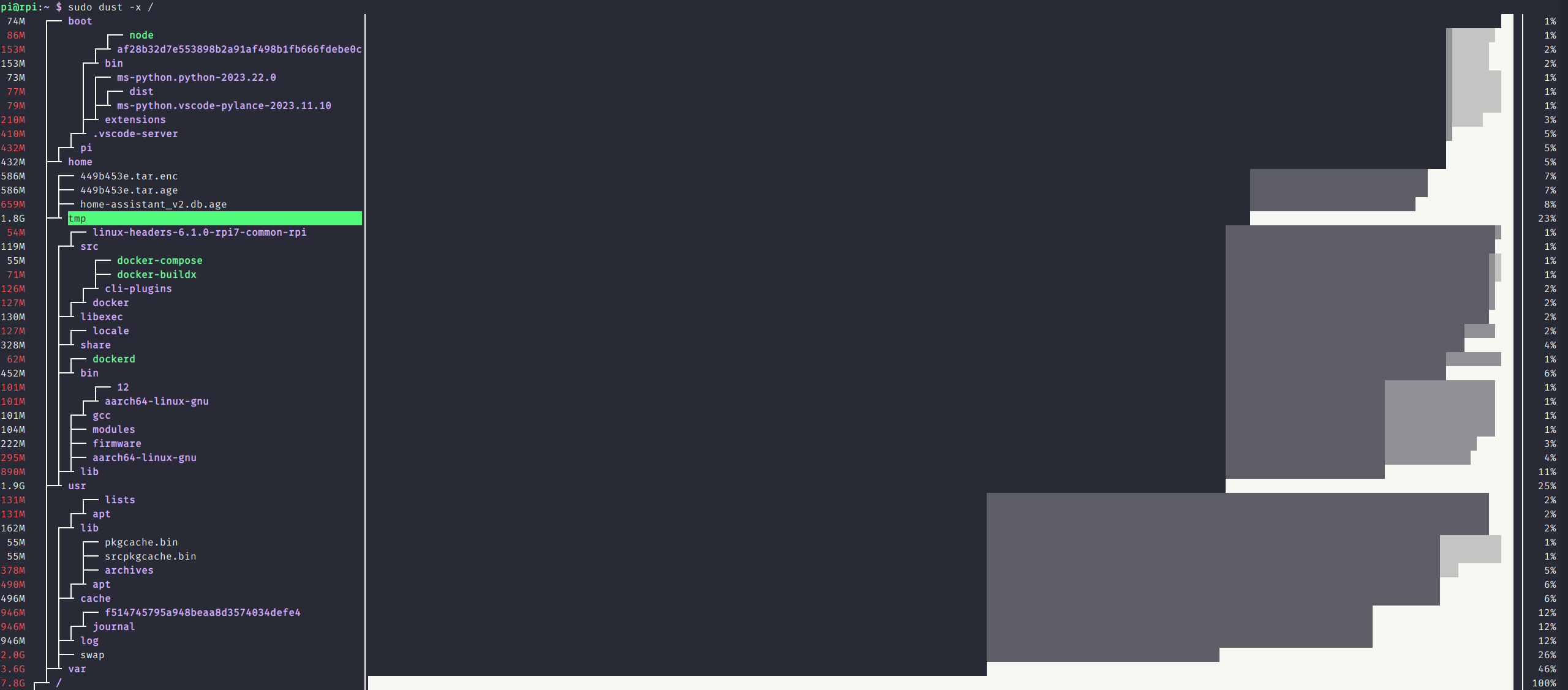
<p>Now that I had some free space to play with, I decided to install <code class="language-plaintext highlighter-rouge">dust</code>, an alternative to <code class="language-plaintext highlighter-rouge">du</code> that works much faster and gives a visual summary of the largest subdirectories or files.</p>

<p>There’s no Debian package for <code class="language-plaintext highlighter-rouge">dust</code>, so I installed it by downloading the <code class="language-plaintext highlighter-rouge">dust-v0.8.6-aarch64-unknown-linux-gnu.tar.gz</code> binary archive from <a href="https://github.com/bootandy/dust/releases/">its releases page on Github</a>, and transferring the <code class="language-plaintext highlighter-rouge">dust</code> binary to <code class="language-plaintext highlighter-rouge">/usr/bin/dust</code> on my Pi. I found that the best way to use it was with the <code class="language-plaintext highlighter-rouge">-x</code> flag, ensuring that it sticks to one filesystem (equivalent to <code class="language-plaintext highlighter-rouge">du -x</code>).</p>

<div class="language-bash highlighter-rouge"><div class="highlight"><pre class="highlight"><code><span class="nb">sudo </span>dust <span class="nt">-x</span> /
</code></pre></div></div>

<p><img src="/assets/2024-01-07-dust-output.png" alt="A screenshot of dust being used in the terminal" /></p>

<p>This brought a few space-wasters to my attention, which I could then delete:</p>

<ul>
  <li>A backup of Home Assistant that I temporarily copied to <code class="language-plaintext highlighter-rouge">~/</code> while restoring it (294 MB)</li>
  <li>Data that had been written to a mount point (by the Home Assistant container) while the drive wasn’t mounted (794 MB)</li>
  <li>A <code class="language-plaintext highlighter-rouge">.mp4</code> file that I’d transferred to the Pi for testing purposes (2.8 GB)</li>
  <li>Binary files that I’d copied to my home directory before installing to <code class="language-plaintext highlighter-rouge">/usr/bin</code> (15 MB)
    <ul>
      <li>This includes <code class="language-plaintext highlighter-rouge">dust</code>, but it only takes up 2 MB anyway :D</li>
    </ul>
  </li>
  <li>Temporary files generated by one of my bash scripts that had lingered in <code class="language-plaintext highlighter-rouge">/tmp</code> (1.8 GB)
    <ul>
      <li>These were from my script that encrypts files and uploads them to the cloud for off-site backup (the encrypted files had lingered)</li>
      <li>I of course then fixed my script to properly delete the encrypted files once it finishes</li>
    </ul>
  </li>
</ul>

<h2 id="result">Result</h2>

<p>Only 43% of the Pi’s microSD card is now used (that’s 7.8 GB free), which should mean that I wont’t have to worry about it being filled up in the near future. That is, unless I make another misbehaving script!</p>]]></content><author><name>MMK21</name><email>hi@slevel.xyz</email></author><category term="jekyll" /><category term="ruby" /><summary type="html"><![CDATA[I logged onto my Raspberry Pi this morning to find that its root filesystem was 100% full (minus the usual space reserved by the kernel).]]></summary></entry><entry><title type="html">Deploying my Jekyll site to Netlify</title><link href="https://blog.slevel.xyz/2024/01/06/deploying-jekyll-to-netlify.html" rel="alternate" type="text/html" title="Deploying my Jekyll site to Netlify" /><published>2024-01-06T19:51:00+00:00</published><updated>2024-01-06T19:51:00+00:00</updated><id>https://blog.slevel.xyz/2024/01/06/deploying-jekyll-to-netlify</id><content type="html" xml:base="https://blog.slevel.xyz/2024/01/06/deploying-jekyll-to-netlify.html"><![CDATA[<p>So, it looks like this is my first post in this blog. Let’s start off with a brief mention of a problem I encountered while trying to set it up.</p>

<h2 id="ruby-versions-on-my-pc">Ruby versions on my PC</h2>

<p>Jekyll uses the Ruby programming language, and like many similar interpreted languages (e.g. Python, Go, Node.js), it’s important to get the right language version installed before software built on it will work.</p>

<p>The Jekyll documentation says that Ruby versions 2.5.0 and above are supported, but when I tried using the latest Ruby version provided by my OS (2.7.0) to install Jekyll, the <code class="language-plaintext highlighter-rouge">gem</code> program complained that a dependency required at least Ruby 3.0.0.</p>

<p>To resolve this, I manually installed the latest published version of Ruby (3.3.0 as of January 2024) with <a href="https://github.com/postmodern/ruby-install">the <code class="language-plaintext highlighter-rouge">ruby-install</code> tool</a>, and fortunately Jekyll was able to successfully install with the updated Ruby environment.</p>

<h2 id="ruby-versions-on-netlify">Ruby versions on Netlify</h2>

<p>For better or for worse, my ordeal with Ruby versions didn’t end with getting my local development environment working. The time came to deploy my site to Netlify (an amazing free static web host), which seems to default to an old version of Ruby (2.7.2, to be specific), meaning that I was once again shown an error message. Fortunately, it was the “good” kind of error message, which clearly states what’s wrong and points you towards a solution (updating Ruby, in this case). Conveniently, Netlify’s docs <a href="https://docs.netlify.com/configure-builds/manage-dependencies/#ruby">detail how to set a specific Ruby version</a> using an environment variable or a <code class="language-plaintext highlighter-rouge">.ruby-version</code> file. One gotcha was that despite claiming to support <a href="https://github.com/rvm/rvm">RVM</a>’s version specifier syntax, Netlify was only able to fetch Ruby if I’d specified an exact version number: <code class="language-plaintext highlighter-rouge">3.3.0</code> worked, but <code class="language-plaintext highlighter-rouge">3.3</code> didn’t.</p>

<p>However, after I’d told Netlify to use the latest Ruby version (3.3.0), I encountered another error that hadn’t happened in my local environment, while <code class="language-plaintext highlighter-rouge">gem</code> was trying to install dependencies:</p>

<pre><code class="language-none">11:32:41 AM: An error occurred while installing google-protobuf (3.25.1), and Bundler cannot
11:32:41 AM: continue.
11:32:41 AM: In Gemfile:
11:32:41 AM:   minima was resolved to 2.5.1, which depends on
11:32:41 AM:     jekyll-feed was resolved to 0.17.0, which depends on
11:32:41 AM:       jekyll was resolved to 4.3.3, which depends on
11:32:41 AM:         jekyll-sass-converter was resolved to 3.0.0, which depends on
11:32:41 AM:           sass-embedded was resolved to 1.69.7, which depends on
11:32:41 AM:             google-protobuf
11:32:41 AM: Error during gem install
11:32:41 AM: Failing build: Failed to install dependencies
</code></pre>

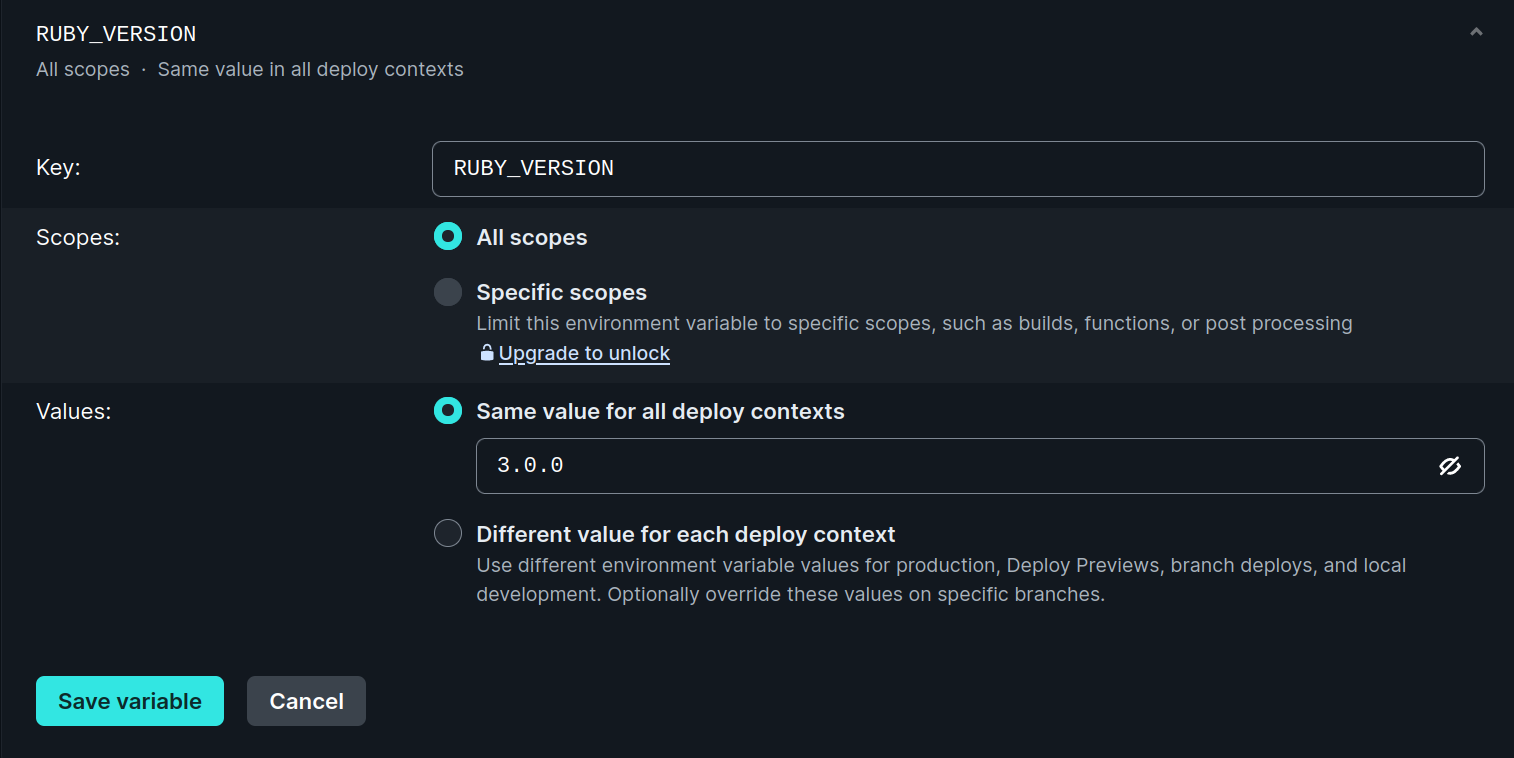
<p>The workaround that I found for this issue was to once again change the Ruby version that Netlify uses – I chose to do this by setting the <code class="language-plaintext highlighter-rouge">RUBY_VERSION</code> environment variable in my site settings.</p>

<p><img src="/assets/2024-01-06-netlify-setting-env.png" alt="A screenshot of the environment variables site config section in Netlify, showing the RUBY_VERSION variable being assigned a value of 3.0.0" /></p>

<p>I chose to set it to <code class="language-plaintext highlighter-rouge">3.0.0</code>, i.e. the earliest version that would avoid the issue from earlier. And this worked! The blog is now live, and assuming that I haven’t changed it since this post, the site you’re on right now is powered by Ruby 3.0.0.</p>

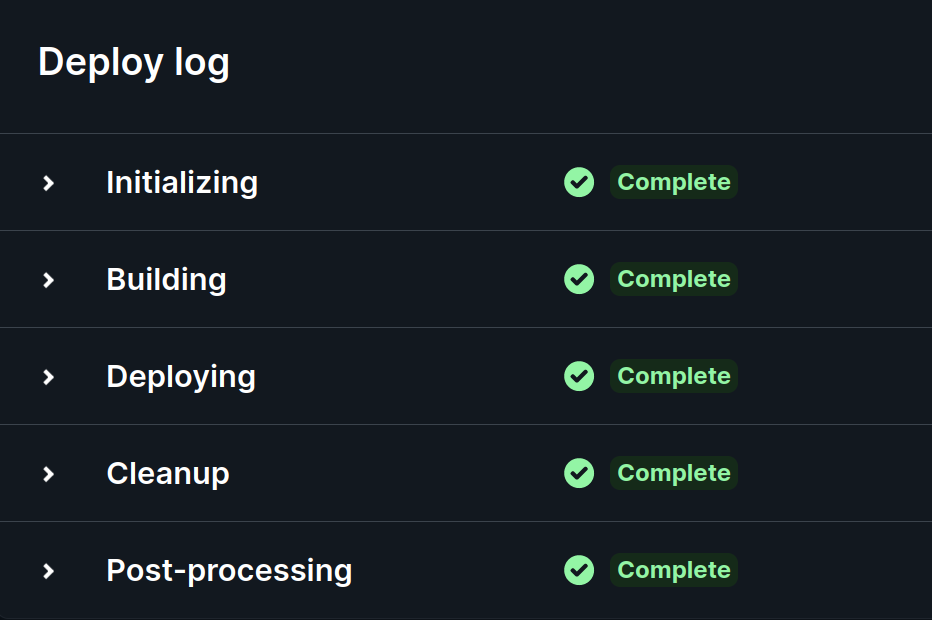
<h2>🎉</h2>

<p><img src="/assets/2024-01-06-netlify-successfull-deploy-log.png" alt="Alt text" /></p>]]></content><author><name>MMK21</name><email>hi@slevel.xyz</email></author><category term="jekyll" /><category term="ruby" /><summary type="html"><![CDATA[So, it looks like this is my first post in this blog. Let’s start off with a brief mention of a problem I encountered while trying to set it up.]]></summary></entry></feed>